> ## Documentation Index
> Fetch the complete documentation index at: https://docs-dev-eval-flywheel-swift-quickstart.mintlify.site/llms.txt
> Use this file to discover all available pages before exploring further.
> Learn how to configure your applications to use Native to Web Single Sign-On.
# Configure and Implement Native to Web SSO
export const AuthCodeGroup = ({children, dropdown}) => {
const [processedChildren, setProcessedChildren] = useState(children);
useEffect(() => {
let unsubscribe = null;
function init() {
unsubscribe = window.autorun(() => {
const processChildren = node => {
if (typeof node === "string") {
let processedNode = node;
for (const [key, value] of window.rootStore.variableStore.values.entries()) {
const escapedKey = key.replaceAll(/[.*+?^${}()|[\]\\]/g, (String.raw)`\$&`);
processedNode = processedNode.replaceAll(new RegExp(escapedKey, "g"), value);
}
return processedNode;
} else if (Array.isArray(node)) {
return node.map(processChildren);
} else if (node && node.props && node.props.children) {
return {
...node,
props: {
...node.props,
children: processChildren(node.props.children)
}
};
}
return node;
};
setProcessedChildren(processChildren(children));
});
}
if (window.rootStore) {
init();
} else {
window.addEventListener("adu:storeReady", init);
}
return () => {
window.removeEventListener("adu:storeReady", init);
unsubscribe?.();
};
}, [children]);
return {processedChildren};
};
export const AuthCodeBlock = ({filename, icon, language, highlight, children}) => {
const [displayText, setDisplayText] = useState(children);
const [copyText, setCopyText] = useState(children);
const wrapperRef = React.useRef(null);
useEffect(() => {
let unsubscribe = null;
function init() {
if (!window.autorun || !window.rootStore) {
return;
}
unsubscribe = window.autorun(() => {
let processedChildrenForDisplay = children;
let processedChildrenForCopy = children;
for (const [key, value] of window.rootStore.variableStore.values.entries()) {
const escapedKey = key.replaceAll(/[.*+?^${}()|[\]\\]/g, (String.raw)`\$&`);
let displayValue = value;
if (key === "{yourClientSecret}" && value !== "{yourClientSecret}") {
displayValue = value.substring(0, 3) + "*****MASKED*****";
}
processedChildrenForDisplay = processedChildrenForDisplay.replaceAll(new RegExp(escapedKey, "g"), displayValue);
processedChildrenForCopy = processedChildrenForCopy.replaceAll(new RegExp(escapedKey, "g"), value);
}
setDisplayText(processedChildrenForDisplay);
setCopyText(processedChildrenForCopy);
});
}
if (window.rootStore) {
init();
} else {
window.addEventListener("adu:storeReady", init);
}
return () => {
window.removeEventListener("adu:storeReady", init);
unsubscribe?.();
};
}, [children]);
useEffect(() => {
if (!wrapperRef.current) return;
const originalWriteText = navigator.clipboard.writeText.bind(navigator.clipboard);
let isOverriding = false;
const handleClick = e => {
const button = e.target.closest('[data-testid="copy-code-button"]');
if (!button || !wrapperRef.current.contains(button)) return;
isOverriding = true;
navigator.clipboard.writeText = text => {
if (isOverriding) {
isOverriding = false;
navigator.clipboard.writeText = originalWriteText;
return originalWriteText(copyText);
}
return originalWriteText(text);
};
setTimeout(() => {
if (isOverriding) {
isOverriding = false;
navigator.clipboard.writeText = originalWriteText;
}
}, 100);
};
const wrapper = wrapperRef.current;
wrapper.addEventListener('click', handleClick, true);
return () => {
wrapper.removeEventListener('click', handleClick, true);
if (navigator.clipboard.writeText !== originalWriteText) {
navigator.clipboard.writeText = originalWriteText;
}
};
}, [copyText]);
return
{displayText}
;
};
## Configure Native to Web SSO
To use Native to Web Single Sign-On (SSO), configure your native and web (Single Page App or Regular Web App) to create and manage sessions with the Auth0 Management API.
You need an [access token](/docs/secure/tokens/access-tokens/management-api-access-tokens) to use the Management API or Auth0 CLI.
To configure Native to Web SSO, you need to create and manage session\_transfer\_tokens and configure your native and web applications.
Native to Web SSO supports the following SDKs: [Auth0 Android SDK](https://github.com/auth0/auth0.android/blob/main/EXAMPLES.md#native-to-web-sso-login-ea), [Auth0 Swift SDK](https://github.com/auth0/Auth0.swift/blob/master/EXAMPLES.md#sso-credentials-ea), and [Auth0 React Native SDK](https://github.com/auth0/react-native-auth0/blob/master/EXAMPLES.md#native-to-web-sso-early-access).
Native to Web SSO support is available in the following tools: [Auth0 Deploy CLI](/docs/deploy-monitor/deploy-cli-tool). [Auth0 Terraform Provider](/docs/deploy-monitor/auth0-terraform-provider) and [Auth0 CLI](https://auth0.github.io/auth0-cli/).
Native to Web SSO supports any authentication flow that returns a refresh token, such as [Resource Owner Password Flow](/docs/secure/multi-factor-authentication/authenticate-using-ropg-flow-with-mfa) and [Authorization Code Flow with Proof Key for Code Exchange](/docs/get-started/authentication-and-authorization-flow/authorization-code-flow-with-pkce).
### Create and manage Session Transfer Tokens
The first Management API call allows your native and web Applications to:
* Create and manage `session_transfer_tokens`
* Create sessions in a web browser via cookies or a URL parameter
* Bind the session to a user's device through an IP address or ASN
For existing applications, make a `PATCH` call to the [Update a Client](https://auth0.com/docs/api/management/v2/clients/patch-clients-by-id) endpoint. To create a new application, make a `POST` call to the [Create a Client](https://auth0.com/docs/api/management/v2/clients/post-clients) endpoint:
```json lines theme={null}
{
"session_transfer": {
"can_create_session_transfer_token": false,
"allowed_authentication_methods": ["cookie", "query"],
"enforce_device_binding": "ip", // also "none" or "asn",
"allow_refresh_token": false,
"enforce_cascade_revocation": true,
"enforce_online_refresh_tokens": true
}
}
```
### Configure native applications
Once a user is authenticated, Auth0 returns an [Access token](/docs/secure/tokens/access-tokens), and [ID token](/docs/secure/tokens/id-tokens), and (optionally) a [Refresh token](/docs/secure/tokens/refresh-tokens).
You can configure your native application to exchange a refresh token for a Session Transfer Token. If your web application does not support cookie injection, your native application also needs to configure your web application’s **Login URI** to inject the Session Transfer Token as a URI parameter.
* Update your native application using the Auth0 Dashboard:
1. Navigate to [Dashboard > Applications](https://manage.auth0.com/dashboard/#/applications):
2. Select or [create your application](/docs/get-started/auth0-overview/create-applications#create-applications).
3. Select the **Settings** tab.
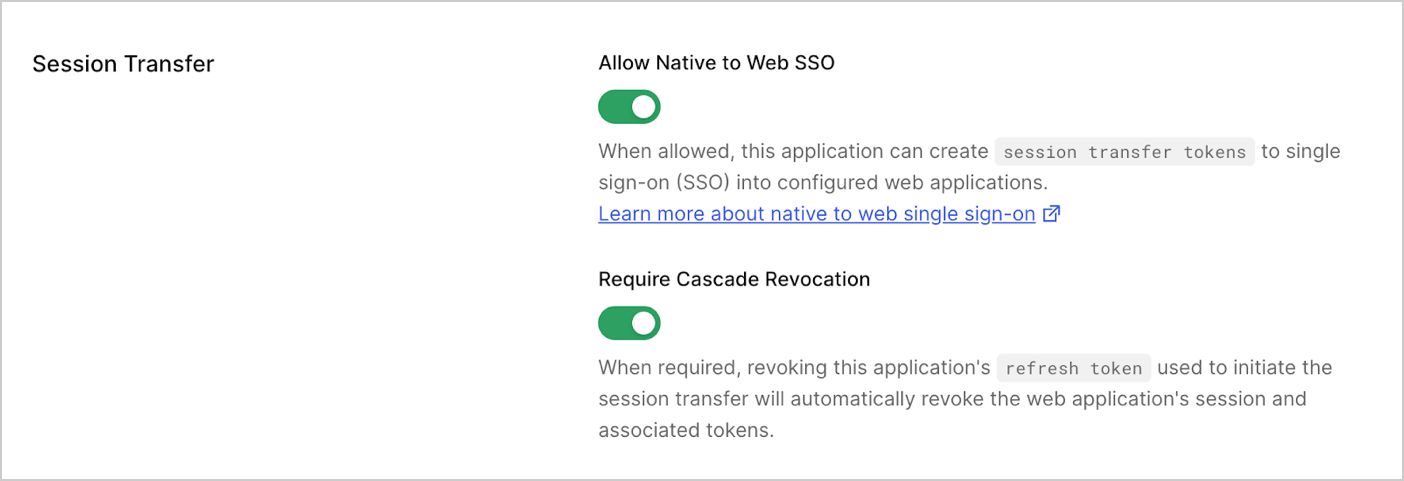
4. Under **Session Transfer**, enable **Allow Native to Web SSO**.
5. Select **Require Cascade Revocation** to automatically revoke the web application's session and associated tokens.
6. Select **Save** to update your application.
 * Update your native application using your Management API Access Token with the [Update a Client](https://auth0.com/docs/api/management/v2/clients/patch-clients-by-id) endpoint:
export const codeExample1 = `curl --request PATCH \
--url 'https://{yourDomain}/api/v2/clients/{yourClientId}' \
--header 'authorization: Bearer {yourMgmtApiAccessToken}' \
--header 'content-type: application/json' \
--data '{
"session_transfer": {
"can_create_session_transfer_token": true,
"enforce_cascade_revocation": true
}
}'`;
* Update your native application using [Auth0 CLI](https://auth0.github.io/auth0-cli/auth0_apps_session-transfer_update.html):
export const codeExample2 = `auth0 apps session-transfer update {yourClientId} --can-create-token=true`;
### Configure web applications
Before you enable Session Transfer Token, make sure you have configured your web application’s **Application Login URI** to handle extra parameters. To learn more about URIs, read [Application Settings](/docs/get-started/applications/application-settings#application-uris).
* Update your web application using the Auth0 Dashboard:
1. Navigate to [Dashboard > Applications](https://manage.auth0.com/dashboard/#/applications):
2. Select or create your web application.
3. Select the **Settings** tab.
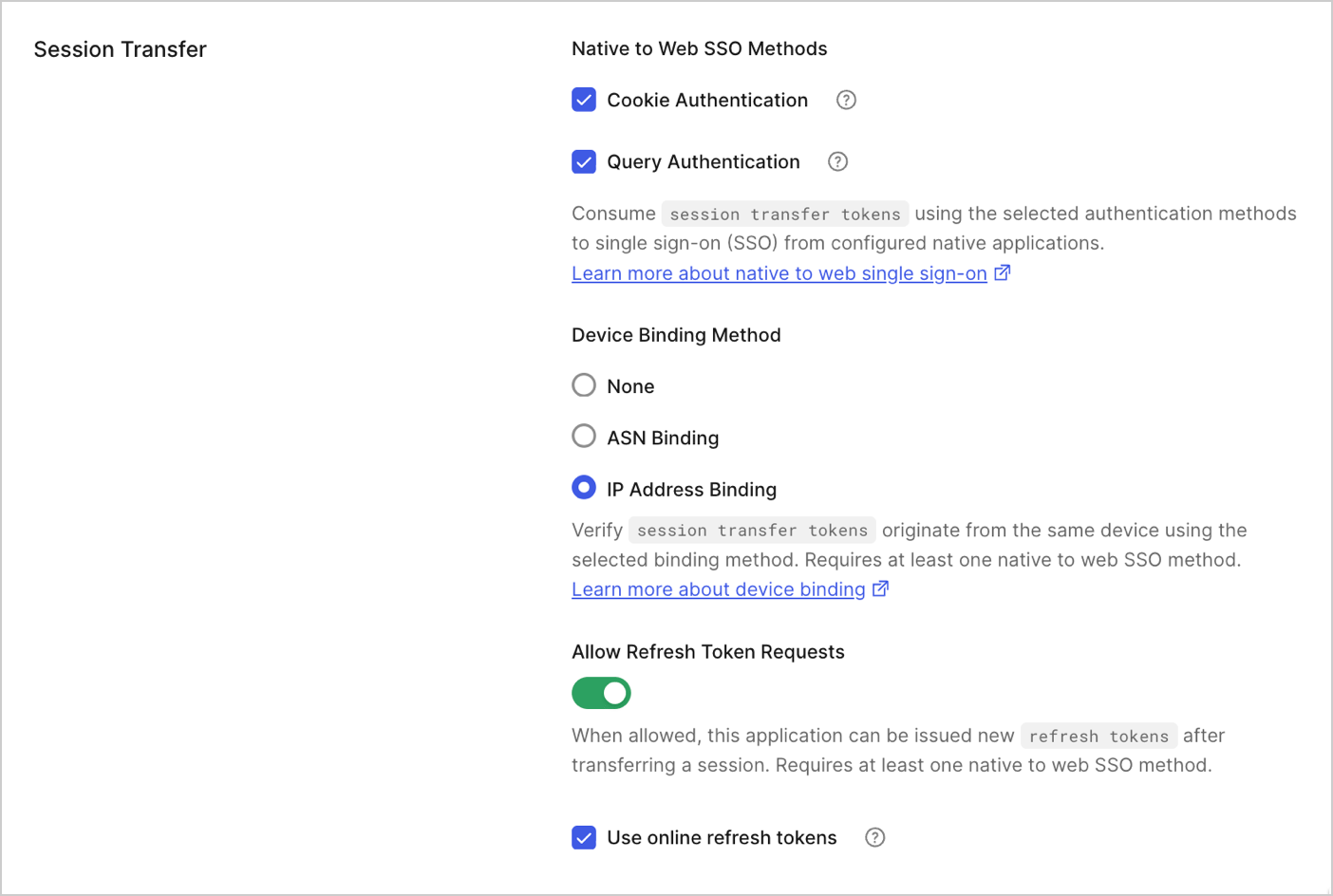
4. Under **Session Transfer**, enable **Native to Web SSO Methods**.
5. Select **Cookie Authentication** and **Query Authentication**.
6. Enable **Device Binding Method**, either **None**, **ASN Binding** or **IP Address Binding**.
7. Enable **Allow Refresh Token Requests** to issue new refresh tokens after a session transfer.
8. Select **Use online refresh tokens**.
9. Select **Save** to update your web application.
* Update your native application using your Management API Access Token with the [Update a Client](https://auth0.com/docs/api/management/v2/clients/patch-clients-by-id) endpoint:
export const codeExample1 = `curl --request PATCH \
--url 'https://{yourDomain}/api/v2/clients/{yourClientId}' \
--header 'authorization: Bearer {yourMgmtApiAccessToken}' \
--header 'content-type: application/json' \
--data '{
"session_transfer": {
"can_create_session_transfer_token": true,
"enforce_cascade_revocation": true
}
}'`;
* Update your native application using [Auth0 CLI](https://auth0.github.io/auth0-cli/auth0_apps_session-transfer_update.html):
export const codeExample2 = `auth0 apps session-transfer update {yourClientId} --can-create-token=true`;
### Configure web applications
Before you enable Session Transfer Token, make sure you have configured your web application’s **Application Login URI** to handle extra parameters. To learn more about URIs, read [Application Settings](/docs/get-started/applications/application-settings#application-uris).
* Update your web application using the Auth0 Dashboard:
1. Navigate to [Dashboard > Applications](https://manage.auth0.com/dashboard/#/applications):
2. Select or create your web application.
3. Select the **Settings** tab.
4. Under **Session Transfer**, enable **Native to Web SSO Methods**.
5. Select **Cookie Authentication** and **Query Authentication**.
6. Enable **Device Binding Method**, either **None**, **ASN Binding** or **IP Address Binding**.
7. Enable **Allow Refresh Token Requests** to issue new refresh tokens after a session transfer.
8. Select **Use online refresh tokens**.
9. Select **Save** to update your web application.
 * Update your web application using the Management API Access Token with the [Update a Client](https://auth0.com/docs/api/management/v2/clients/patch-clients-by-id) endpoint:
export const codeExample3 = `curl --request PATCH \
--url '{yourDomain}/api/v2/clients//{yourClientId}' \
--header 'authorization: Bearer {yourMgmtApiAccessToken}' \
--header 'content-type: application/json' \
--data '{
"session_transfer": {
"allowed_authentication_methods": ["cookie", "query"],
"enforce_device_binding": "ip", // also "none" or "asn",
"allow_refresh_token": false,
"enforce_online_refresh_tokens": true
}
}'`;
* Update your web application using [Auth0 CLI](https://auth0.github.io/auth0-cli/auth0_apps_session-transfer_update.html):
export const codeExample4 = `auth0 apps session-transfer update {yourClientId} --allowed-auth-methods=cookie,query --enforce-device-binding=ip`;
## Implement Native to Web SSO
Native to Web Single SSO provides a seamless user experience transitioning authenticated users from your native application to your web application.
To facilitate this, your native application needs to exchange a refresh token for a Session Transfer Token and send the Session Transfer Token, through a URL or cookie, to your web application to authorize the session.
* If `allow_refresh_token` is disabled in the client but the application requests `offline_access`, Auth0 will not issue a `refresh_token` but the authentication will still work.
* If refresh token rotation is enabled, Auth0 returns a new `refresh_token` in the token exchange call. The refresh token exchange should happen immediately before your code opens the web application.
### In your native application
#### Step 1: Exchanging a Refresh Token for a Session Transfer Token
Use the [/token](https://auth0.com/docs/api/authentication/authorization-code-flow-with-pkce/get-token-pkce) endpoint with your native application to exchange the refresh token for a Session Transfer Token.
* Exchange a refresh token for a session transfer token using Swift, Android, or React Native SDKs:
```swift lines theme={null}
credentialsManager.ssoCredentials { result in
switch result {
case .success(let ssoCredentials):
print("Obtained SSO credentials: \(ssoCredentials)")
case .failure(let error):
print("Failed with: \(error)")
}
}
// Or, using async/await
do {
let ssoCredentials = try await credentialsManager.ssoCredentials()
print("Obtained SSO credentials: \(ssoCredentials)")
} catch {
print("Failed with: \(error)")
}
```
```kotlin lines theme={null}
secureCredentialsManager.getSsoCredentials(
mapOf(), // optional parameters
object : Callback {
override fun onSuccess(result: SSOCredentials) {
// Use result.sessionTransferToken to authenticate
// the user in a web session in your app
}
override fun onFailure(error: CredentialsManagerException) {
// Handle error
}
}
)
```
```typescript lines theme={null}
// Using Hooks
import { useAuth0 } from 'react-native-auth0';
function MyComponent() {
const { getSSOCredentials } = useAuth0();
const openWebApp = async () => {
try {
const ssoCredentials = await getSSOCredentials();
// Use ssoCredentials.sessionTransferToken to authenticate
// the user in a web session in your app
console.log('Session Transfer Token:', ssoCredentials.sessionTransferToken);
} catch (error) {
console.error('Failed to get SSO credentials:', error);
}
};
}
// Using Auth0 class
import Auth0 from 'react-native-auth0';
const auth0 = new Auth0({
domain: '{yourDomain}',
clientId: '{yourClientId}',
});
const ssoCredentials = await auth0.credentialsManager.getSSOCredentials();
console.log('Session Transfer Token:', ssoCredentials.sessionTransferToken);
```
* Exchange a refresh token for a session transfer token using HTTP:
export const codeExample5 = `curl -X POST https://{yourDomain}/oauth/token \
-H 'Content-type: application/json' \
-d '{"grant_type":"refresh_token",
"client_id":{yourClientId}",
"refresh_token":"YOUR_REFRESH_TOKEN",
"audience":"urn:YOUR_AUTH0_TENANT_DOMAIN:session_transfer"}'`;
These samples use placeholder variables for dynamic variables. Replace the placeholders using your Auth0 domain, client\_id and an existing refresh\_token.
The Auth0 tenant returns a single-use and short-lived (1-minute lifetime) session\_transfer\_token.
```json lines theme={null}
{
"access_token": "{session_transfer_token}",
"issued_token_type": "urn:auth0:params:oauth:token-type:session_transfer_token",
"token_type": "N_A",
"expires_in": 60
}
```
If refresh token rotation is enabled, the exchange will also return a refresh token.
If you requested an ID Token during authentication, this call will also return an ID Token.
#### Step 2: Send the Session Transfer Token through a URL or cookie
There are two options to send the `session_transfer_token` to your web application based on the configured `allowed_authentication_methods`.
##### Option 1: Send the session\_transfer\_token as a cookie
If your web application using WebView or browser supports cookie injection, you can configure your native application to:
* Add the session\_transfer\_token into a cookie.
* Open the web application using WebView or browser.
* Log the web application to your Auth0 tenant or Custom Domain. As the `session_transfer_token` is included in the cookie, the user is not prompted for first-factor authentication.
export const codeExample6 = `curl --cookie auth0_session_transfer_token=YOUR_SESSION_TRANSFER_TOKEN
https://{yourDomain}/authorize?{authorize_params}`;
##### Option 2: Send the session\_transfer\_token as a URL parameter
If your web application does not support cookie injection, you can configure your native application using URL parameters to:
* Add the session\_transfer\_token as a URL parameter.
* Open the web application using WebView or browser.
* Log the web application appending the `session_transfer_token` as a URL parameter to the [/authorize](https://auth0.com/docs/api/authentication/authorization-code-flow/authorize-application) endpoint. The Auth0 tenant authenticates the user without requiring first-factor authentication, as the session\_transfer\_token is valid and trusted
```bash cURL lines theme={null}
curl --request GET \
--url 'https://your_web_app_login_url/?session_transfer_token=YOUR_SESSION_TRANSFER_TOKEN'
```
```csharp C# lines theme={null}
var client = new RestClient("https://your_web_app_login_url/?session_transfer_token=YOUR_SESSION_TRANSFER_TOKEN");
var request = new RestRequest(Method.GET);
IRestResponse response = client.Execute(request);
```
```go Go lines theme={null}
package main
import (
"fmt"
"net/http"
"io/ioutil"
)
func main() {
url := "https://your_web_app_login_url/?session_transfer_token=YOUR_SESSION_TRANSFER_TOKEN"
req, _ := http.NewRequest("GET", url, nil)
res, _ := http.DefaultClient.Do(req)
defer res.Body.Close()
body, _ := ioutil.ReadAll(res.Body)
fmt.Println(res)
fmt.Println(string(body))
}
```
```java Java lines theme={null}
HttpResponse response = Unirest.get("https://your_web_app_login_url/?session_transfer_token=YOUR_SESSION_TRANSFER_TOKEN")
.asString();
```
```javascript Node.JS lines theme={null}
var axios = require("axios").default;
var options = {
method: 'GET',
url: 'https://your_web_app_login_url/',
params: {session_transfer_token: 'YOUR_SESSION_TRANSFER_TOKEN'}
};
axios.request(options).then(function (response) {
console.log(response.data);
}).catch(function (error) {
console.error(error);
});
```
```php PHP lines theme={null}
$curl = curl_init();
curl_setopt_array($curl, [
CURLOPT_URL => "https://your_web_app_login_url/?session_transfer_token=YOUR_SESSION_TRANSFER_TOKEN",
CURLOPT_RETURNTRANSFER => true,
CURLOPT_ENCODING => "",
CURLOPT_MAXREDIRS => 10,
CURLOPT_TIMEOUT => 30,
CURLOPT_HTTP_VERSION => CURL_HTTP_VERSION_1_1,
CURLOPT_CUSTOMREQUEST => "GET",
]);
$response = curl_exec($curl);
$err = curl_error($curl);
curl_close($curl);
if ($err) {
echo "cURL Error #:" . $err;
} else {
echo $response;
}
```
```python Python lines theme={null}
import http.client
conn = http.client.HTTPSConnection("your_web_app_login_url")
conn.request("GET", "/?session_transfer_token=YOUR_SESSION_TRANSFER_TOKEN")
res = conn.getresponse()
data = res.read()
print(data.decode("utf-8"))
```
```ruby Ruby lines theme={null}
require 'uri'
require 'net/http'
require 'openssl'
url = URI("https://your_web_app_login_url/?session_transfer_token=YOUR_SESSION_TRANSFER_TOKEN")
http = Net::HTTP.new(url.host, url.port)
http.use_ssl = true
http.verify_mode = OpenSSL::SSL::VERIFY_NONE
request = Net::HTTP::Get.new(url)
response = http.request(request)
puts response.read_body
```
### In your web application
When the Session Transfer Token is sent as a cookie, no further configuration is needed as the browser sends the cookie in the `/authorize` endpoint request.
Implement Native to Web Web Single SSO in your web application using URL parameters by:
#### Option 1: Add the Session Transfer Token in your web application request
From the application login URL, redirect to the `/authorize` endpoint when the `session_transfer_token` is sent as a URL parameter.
```bash cURL theme={null}
curl --request GET \
--url 'https://{yourDomain}/authorize?session_transfer_token=YOUR_SESSION_TRANSFER_TOKEN&client_ID={yourClientId}&redirect_uri=YOUR_REDIRECT_URI&response_type=code'
```
```csharp C# theme={null}
var client = new RestClient("https://{yourDomain}/authorize?session_transfer_token=YOUR_SESSION_TRANSFER_TOKEN&client_ID={yourClientId}&redirect_uri=YOUR_REDIRECT_URI&response_type=code");
var request = new RestRequest(Method.GET);
IRestResponse response = client.Execute(request);
```
```go Go theme={null}
package main
import (
"fmt"
"net/http"
"io/ioutil"
)
func main() {
url := "https://{yourDomain}/authorize?session_transfer_token=YOUR_SESSION_TRANSFER_TOKEN&client_ID={yourClientId}&redirect_uri=YOUR_REDIRECT_URI&response_type=code"
req, _ := http.NewRequest("GET", url, nil)
res, _ := http.DefaultClient.Do(req)
defer res.Body.Close()
body, _ := ioutil.ReadAll(res.Body)
fmt.Println(res)
fmt.Println(string(body))
}
```
```java Java theme={null}
HttpResponse response = Unirest.get("https://{yourDomain}/authorize?session_transfer_token=YOUR_SESSION_TRANSFER_TOKEN&client_ID={yourClientId}&redirect_uri=YOUR_REDIRECT_URI&response_type=code")
.asString();
```
```javascript Node.JS theme={null}
var axios = require("axios").default;
var options = {
method: 'GET',
url: 'https://{yourDomain}/authorize',
params: {
session_transfer_token: 'YOUR_SESSION_TRANSFER_TOKEN',
client_ID: '{yourClientId}',
redirect_uri: 'YOUR_REDIRECT_URI',
response_type: 'code'
}
};
axios.request(options).then(function (response) {
console.log(response.data);
}).catch(function (error) {
console.error(error);
});
```
```php PHP theme={null}
$curl = curl_init();
curl_setopt_array($curl, [
CURLOPT_URL => "https://{yourDomain}/authorize?session_transfer_token=YOUR_SESSION_TRANSFER_TOKEN&client_ID={yourClientId}&redirect_uri=YOUR_REDIRECT_URI&response_type=code",
CURLOPT_RETURNTRANSFER => true,
CURLOPT_ENCODING => "",
CURLOPT_MAXREDIRS => 10,
CURLOPT_TIMEOUT => 30,
CURLOPT_HTTP_VERSION => CURL_HTTP_VERSION_1_1,
CURLOPT_CUSTOMREQUEST => "GET",
]);
$response = curl_exec($curl);
$err = curl_error($curl);
curl_close($curl);
if ($err) {
echo "cURL Error #:" . $err;
} else {
echo $response;
}
```
```python Python theme={null}
import http.client
conn = http.client.HTTPSConnection("")
conn.request("GET", "/{yourDomain}/authorize?session_transfer_token=YOUR_SESSION_TRANSFER_TOKEN&client_ID={yourClientId}&redirect_uri=YOUR_REDIRECT_URI&response_type=code")
res = conn.getresponse()
data = res.read()
print(data.decode("utf-8"))
```
#### Option 2: Add the Session Transfer Token to web applications using Auth0 SDKs
Auth0 SDKs do not support Native to Web Single SSO automatically and they will not include the `session_transfer_token` in the `/authorize` endpoint request.
Below are examples of web applications using Auth0 SDKs to redirect the `session_transfer_token` in the `/authorize` endpoint request:
##### Node (Express.js)
If your web application uses [Express.js](https://expressjs.com/) or the [Auth0 Express SDK](https://github.com/auth0/express-openid-connect), you can use the code below to add middleware support for `session_transfer_token`.
```javascript javascript lines theme={null}
const baseConfig = {
authRequired: false,
auth0Logout: true
};
// Extending the middleware to auto detect session_transfer_token
app.use((req, res, next) => {
const { session_transfer_token } = req.query;
// Create a new config for each request to avoid state leakage
const config = { ...baseConfig };
if (session_transfer_token) {
config.authorizationParams = {
session_transfer_token,
};
}
auth(config)(req, res, next);
});
```
##### Auth0 SPA SDK (@auth0/auth0-spa-js)
If your web application uses the [Auth0 SPA SDK](https://github.com/auth0/auth0-spa-js), you can pass the `session_transfer_token` to `loginWithRedirect()` via `authorizationParams`.
```typescript typescript lines theme={null}
import { Auth0Client } from '@auth0/auth0-spa-js';
const auth0 = new Auth0Client({
domain: '{yourDomain}',
clientId: '{yourClientId}',
});
// Get session_transfer_token from URL query params (passed from native app)
const urlParams = new URLSearchParams(window.location.search);
const sessionTransferToken = urlParams.get('session_transfer_token');
// Use loginWithRedirect with the session_transfer_token
if (sessionTransferToken) {
await auth0.loginWithRedirect({
authorizationParams: {
session_transfer_token: sessionTransferToken,
redirect_uri: window.location.origin,
},
});
}
```
##### Auth0 React SDK (@auth0/auth0-react)
If your web application uses the [Auth0 React SDK](https://github.com/auth0/auth0-react), you can use `loginWithRedirect` from the `useAuth0` hook to pass the `session_transfer_token`.
```typescript typescript lines theme={null}
import { useEffect } from 'react';
import { useAuth0 } from '@auth0/auth0-react';
function App() {
const { loginWithRedirect, isAuthenticated, isLoading } = useAuth0();
useEffect(() => {
if (isLoading || isAuthenticated) return;
const urlParams = new URLSearchParams(window.location.search);
const sessionTransferToken = urlParams.get('session_transfer_token');
if (sessionTransferToken) {
loginWithRedirect({
authorizationParams: {
session_transfer_token: sessionTransferToken,
},
});
}
}, [loginWithRedirect, isLoading, isAuthenticated]);
return
* Update your web application using the Management API Access Token with the [Update a Client](https://auth0.com/docs/api/management/v2/clients/patch-clients-by-id) endpoint:
export const codeExample3 = `curl --request PATCH \
--url '{yourDomain}/api/v2/clients//{yourClientId}' \
--header 'authorization: Bearer {yourMgmtApiAccessToken}' \
--header 'content-type: application/json' \
--data '{
"session_transfer": {
"allowed_authentication_methods": ["cookie", "query"],
"enforce_device_binding": "ip", // also "none" or "asn",
"allow_refresh_token": false,
"enforce_online_refresh_tokens": true
}
}'`;
* Update your web application using [Auth0 CLI](https://auth0.github.io/auth0-cli/auth0_apps_session-transfer_update.html):
export const codeExample4 = `auth0 apps session-transfer update {yourClientId} --allowed-auth-methods=cookie,query --enforce-device-binding=ip`;
## Implement Native to Web SSO
Native to Web Single SSO provides a seamless user experience transitioning authenticated users from your native application to your web application.
To facilitate this, your native application needs to exchange a refresh token for a Session Transfer Token and send the Session Transfer Token, through a URL or cookie, to your web application to authorize the session.
* If `allow_refresh_token` is disabled in the client but the application requests `offline_access`, Auth0 will not issue a `refresh_token` but the authentication will still work.
* If refresh token rotation is enabled, Auth0 returns a new `refresh_token` in the token exchange call. The refresh token exchange should happen immediately before your code opens the web application.
### In your native application
#### Step 1: Exchanging a Refresh Token for a Session Transfer Token
Use the [/token](https://auth0.com/docs/api/authentication/authorization-code-flow-with-pkce/get-token-pkce) endpoint with your native application to exchange the refresh token for a Session Transfer Token.
* Exchange a refresh token for a session transfer token using Swift, Android, or React Native SDKs:
```swift lines theme={null}
credentialsManager.ssoCredentials { result in
switch result {
case .success(let ssoCredentials):
print("Obtained SSO credentials: \(ssoCredentials)")
case .failure(let error):
print("Failed with: \(error)")
}
}
// Or, using async/await
do {
let ssoCredentials = try await credentialsManager.ssoCredentials()
print("Obtained SSO credentials: \(ssoCredentials)")
} catch {
print("Failed with: \(error)")
}
```
```kotlin lines theme={null}
secureCredentialsManager.getSsoCredentials(
mapOf(), // optional parameters
object : Callback {
override fun onSuccess(result: SSOCredentials) {
// Use result.sessionTransferToken to authenticate
// the user in a web session in your app
}
override fun onFailure(error: CredentialsManagerException) {
// Handle error
}
}
)
```
```typescript lines theme={null}
// Using Hooks
import { useAuth0 } from 'react-native-auth0';
function MyComponent() {
const { getSSOCredentials } = useAuth0();
const openWebApp = async () => {
try {
const ssoCredentials = await getSSOCredentials();
// Use ssoCredentials.sessionTransferToken to authenticate
// the user in a web session in your app
console.log('Session Transfer Token:', ssoCredentials.sessionTransferToken);
} catch (error) {
console.error('Failed to get SSO credentials:', error);
}
};
}
// Using Auth0 class
import Auth0 from 'react-native-auth0';
const auth0 = new Auth0({
domain: '{yourDomain}',
clientId: '{yourClientId}',
});
const ssoCredentials = await auth0.credentialsManager.getSSOCredentials();
console.log('Session Transfer Token:', ssoCredentials.sessionTransferToken);
```
* Exchange a refresh token for a session transfer token using HTTP:
export const codeExample5 = `curl -X POST https://{yourDomain}/oauth/token \
-H 'Content-type: application/json' \
-d '{"grant_type":"refresh_token",
"client_id":{yourClientId}",
"refresh_token":"YOUR_REFRESH_TOKEN",
"audience":"urn:YOUR_AUTH0_TENANT_DOMAIN:session_transfer"}'`;
These samples use placeholder variables for dynamic variables. Replace the placeholders using your Auth0 domain, client\_id and an existing refresh\_token.
The Auth0 tenant returns a single-use and short-lived (1-minute lifetime) session\_transfer\_token.
```json lines theme={null}
{
"access_token": "{session_transfer_token}",
"issued_token_type": "urn:auth0:params:oauth:token-type:session_transfer_token",
"token_type": "N_A",
"expires_in": 60
}
```
If refresh token rotation is enabled, the exchange will also return a refresh token.
If you requested an ID Token during authentication, this call will also return an ID Token.
#### Step 2: Send the Session Transfer Token through a URL or cookie
There are two options to send the `session_transfer_token` to your web application based on the configured `allowed_authentication_methods`.
##### Option 1: Send the session\_transfer\_token as a cookie
If your web application using WebView or browser supports cookie injection, you can configure your native application to:
* Add the session\_transfer\_token into a cookie.
* Open the web application using WebView or browser.
* Log the web application to your Auth0 tenant or Custom Domain. As the `session_transfer_token` is included in the cookie, the user is not prompted for first-factor authentication.
export const codeExample6 = `curl --cookie auth0_session_transfer_token=YOUR_SESSION_TRANSFER_TOKEN
https://{yourDomain}/authorize?{authorize_params}`;
##### Option 2: Send the session\_transfer\_token as a URL parameter
If your web application does not support cookie injection, you can configure your native application using URL parameters to:
* Add the session\_transfer\_token as a URL parameter.
* Open the web application using WebView or browser.
* Log the web application appending the `session_transfer_token` as a URL parameter to the [/authorize](https://auth0.com/docs/api/authentication/authorization-code-flow/authorize-application) endpoint. The Auth0 tenant authenticates the user without requiring first-factor authentication, as the session\_transfer\_token is valid and trusted
```bash cURL lines theme={null}
curl --request GET \
--url 'https://your_web_app_login_url/?session_transfer_token=YOUR_SESSION_TRANSFER_TOKEN'
```
```csharp C# lines theme={null}
var client = new RestClient("https://your_web_app_login_url/?session_transfer_token=YOUR_SESSION_TRANSFER_TOKEN");
var request = new RestRequest(Method.GET);
IRestResponse response = client.Execute(request);
```
```go Go lines theme={null}
package main
import (
"fmt"
"net/http"
"io/ioutil"
)
func main() {
url := "https://your_web_app_login_url/?session_transfer_token=YOUR_SESSION_TRANSFER_TOKEN"
req, _ := http.NewRequest("GET", url, nil)
res, _ := http.DefaultClient.Do(req)
defer res.Body.Close()
body, _ := ioutil.ReadAll(res.Body)
fmt.Println(res)
fmt.Println(string(body))
}
```
```java Java lines theme={null}
HttpResponse response = Unirest.get("https://your_web_app_login_url/?session_transfer_token=YOUR_SESSION_TRANSFER_TOKEN")
.asString();
```
```javascript Node.JS lines theme={null}
var axios = require("axios").default;
var options = {
method: 'GET',
url: 'https://your_web_app_login_url/',
params: {session_transfer_token: 'YOUR_SESSION_TRANSFER_TOKEN'}
};
axios.request(options).then(function (response) {
console.log(response.data);
}).catch(function (error) {
console.error(error);
});
```
```php PHP lines theme={null}
$curl = curl_init();
curl_setopt_array($curl, [
CURLOPT_URL => "https://your_web_app_login_url/?session_transfer_token=YOUR_SESSION_TRANSFER_TOKEN",
CURLOPT_RETURNTRANSFER => true,
CURLOPT_ENCODING => "",
CURLOPT_MAXREDIRS => 10,
CURLOPT_TIMEOUT => 30,
CURLOPT_HTTP_VERSION => CURL_HTTP_VERSION_1_1,
CURLOPT_CUSTOMREQUEST => "GET",
]);
$response = curl_exec($curl);
$err = curl_error($curl);
curl_close($curl);
if ($err) {
echo "cURL Error #:" . $err;
} else {
echo $response;
}
```
```python Python lines theme={null}
import http.client
conn = http.client.HTTPSConnection("your_web_app_login_url")
conn.request("GET", "/?session_transfer_token=YOUR_SESSION_TRANSFER_TOKEN")
res = conn.getresponse()
data = res.read()
print(data.decode("utf-8"))
```
```ruby Ruby lines theme={null}
require 'uri'
require 'net/http'
require 'openssl'
url = URI("https://your_web_app_login_url/?session_transfer_token=YOUR_SESSION_TRANSFER_TOKEN")
http = Net::HTTP.new(url.host, url.port)
http.use_ssl = true
http.verify_mode = OpenSSL::SSL::VERIFY_NONE
request = Net::HTTP::Get.new(url)
response = http.request(request)
puts response.read_body
```
### In your web application
When the Session Transfer Token is sent as a cookie, no further configuration is needed as the browser sends the cookie in the `/authorize` endpoint request.
Implement Native to Web Web Single SSO in your web application using URL parameters by:
#### Option 1: Add the Session Transfer Token in your web application request
From the application login URL, redirect to the `/authorize` endpoint when the `session_transfer_token` is sent as a URL parameter.
```bash cURL theme={null}
curl --request GET \
--url 'https://{yourDomain}/authorize?session_transfer_token=YOUR_SESSION_TRANSFER_TOKEN&client_ID={yourClientId}&redirect_uri=YOUR_REDIRECT_URI&response_type=code'
```
```csharp C# theme={null}
var client = new RestClient("https://{yourDomain}/authorize?session_transfer_token=YOUR_SESSION_TRANSFER_TOKEN&client_ID={yourClientId}&redirect_uri=YOUR_REDIRECT_URI&response_type=code");
var request = new RestRequest(Method.GET);
IRestResponse response = client.Execute(request);
```
```go Go theme={null}
package main
import (
"fmt"
"net/http"
"io/ioutil"
)
func main() {
url := "https://{yourDomain}/authorize?session_transfer_token=YOUR_SESSION_TRANSFER_TOKEN&client_ID={yourClientId}&redirect_uri=YOUR_REDIRECT_URI&response_type=code"
req, _ := http.NewRequest("GET", url, nil)
res, _ := http.DefaultClient.Do(req)
defer res.Body.Close()
body, _ := ioutil.ReadAll(res.Body)
fmt.Println(res)
fmt.Println(string(body))
}
```
```java Java theme={null}
HttpResponse response = Unirest.get("https://{yourDomain}/authorize?session_transfer_token=YOUR_SESSION_TRANSFER_TOKEN&client_ID={yourClientId}&redirect_uri=YOUR_REDIRECT_URI&response_type=code")
.asString();
```
```javascript Node.JS theme={null}
var axios = require("axios").default;
var options = {
method: 'GET',
url: 'https://{yourDomain}/authorize',
params: {
session_transfer_token: 'YOUR_SESSION_TRANSFER_TOKEN',
client_ID: '{yourClientId}',
redirect_uri: 'YOUR_REDIRECT_URI',
response_type: 'code'
}
};
axios.request(options).then(function (response) {
console.log(response.data);
}).catch(function (error) {
console.error(error);
});
```
```php PHP theme={null}
$curl = curl_init();
curl_setopt_array($curl, [
CURLOPT_URL => "https://{yourDomain}/authorize?session_transfer_token=YOUR_SESSION_TRANSFER_TOKEN&client_ID={yourClientId}&redirect_uri=YOUR_REDIRECT_URI&response_type=code",
CURLOPT_RETURNTRANSFER => true,
CURLOPT_ENCODING => "",
CURLOPT_MAXREDIRS => 10,
CURLOPT_TIMEOUT => 30,
CURLOPT_HTTP_VERSION => CURL_HTTP_VERSION_1_1,
CURLOPT_CUSTOMREQUEST => "GET",
]);
$response = curl_exec($curl);
$err = curl_error($curl);
curl_close($curl);
if ($err) {
echo "cURL Error #:" . $err;
} else {
echo $response;
}
```
```python Python theme={null}
import http.client
conn = http.client.HTTPSConnection("")
conn.request("GET", "/{yourDomain}/authorize?session_transfer_token=YOUR_SESSION_TRANSFER_TOKEN&client_ID={yourClientId}&redirect_uri=YOUR_REDIRECT_URI&response_type=code")
res = conn.getresponse()
data = res.read()
print(data.decode("utf-8"))
```
#### Option 2: Add the Session Transfer Token to web applications using Auth0 SDKs
Auth0 SDKs do not support Native to Web Single SSO automatically and they will not include the `session_transfer_token` in the `/authorize` endpoint request.
Below are examples of web applications using Auth0 SDKs to redirect the `session_transfer_token` in the `/authorize` endpoint request:
##### Node (Express.js)
If your web application uses [Express.js](https://expressjs.com/) or the [Auth0 Express SDK](https://github.com/auth0/express-openid-connect), you can use the code below to add middleware support for `session_transfer_token`.
```javascript javascript lines theme={null}
const baseConfig = {
authRequired: false,
auth0Logout: true
};
// Extending the middleware to auto detect session_transfer_token
app.use((req, res, next) => {
const { session_transfer_token } = req.query;
// Create a new config for each request to avoid state leakage
const config = { ...baseConfig };
if (session_transfer_token) {
config.authorizationParams = {
session_transfer_token,
};
}
auth(config)(req, res, next);
});
```
##### Auth0 SPA SDK (@auth0/auth0-spa-js)
If your web application uses the [Auth0 SPA SDK](https://github.com/auth0/auth0-spa-js), you can pass the `session_transfer_token` to `loginWithRedirect()` via `authorizationParams`.
```typescript typescript lines theme={null}
import { Auth0Client } from '@auth0/auth0-spa-js';
const auth0 = new Auth0Client({
domain: '{yourDomain}',
clientId: '{yourClientId}',
});
// Get session_transfer_token from URL query params (passed from native app)
const urlParams = new URLSearchParams(window.location.search);
const sessionTransferToken = urlParams.get('session_transfer_token');
// Use loginWithRedirect with the session_transfer_token
if (sessionTransferToken) {
await auth0.loginWithRedirect({
authorizationParams: {
session_transfer_token: sessionTransferToken,
redirect_uri: window.location.origin,
},
});
}
```
##### Auth0 React SDK (@auth0/auth0-react)
If your web application uses the [Auth0 React SDK](https://github.com/auth0/auth0-react), you can use `loginWithRedirect` from the `useAuth0` hook to pass the `session_transfer_token`.
```typescript typescript lines theme={null}
import { useEffect } from 'react';
import { useAuth0 } from '@auth0/auth0-react';
function App() {
const { loginWithRedirect, isAuthenticated, isLoading } = useAuth0();
useEffect(() => {
if (isLoading || isAuthenticated) return;
const urlParams = new URLSearchParams(window.location.search);
const sessionTransferToken = urlParams.get('session_transfer_token');
if (sessionTransferToken) {
loginWithRedirect({
authorizationParams: {
session_transfer_token: sessionTransferToken,
},
});
}
}, [loginWithRedirect, isLoading, isAuthenticated]);
return ...
;
}
```
##### SAML and WS-Federation
If your web application uses SAML or WS-Fed service provider and Auth0 as the IdP, you can send the `session_transfer_token` as an URL parameter to the Auth0 `/authorize` endpoint and the `redirect_uri` is the SAML or WS-Fed sign-in URL.
```bash cURL theme={null}
curl --request GET \
--url 'https://{yourDomain}/samlp//{yourClientId}?session_transfer_token=YOUR_SESSION_TRANSFER_TOKEN' \
--header 'cookie: session_transfer_token=YOUR_SESSION_TRANSFER_TOKEN' \
--cookie session_transfer_token=YOUR_SESSION_TRANSFER_TOKEN
```
```csharp C# theme={null}
var client = new RestClient("https://{yourDomain}/samlp//{yourClientId}?session_transfer_token=YOUR_SESSION_TRANSFER_TOKEN");
var request = new RestRequest(Method.GET);
request.AddHeader("cookie", "session_transfer_token=YOUR_SESSION_TRANSFER_TOKEN");
IRestResponse response = client.Execute(request);
```
```go Go theme={null}
package main
import (
"fmt"
"net/http"
"io/ioutil"
)
func main() {
url := "https://{yourDomain}/samlp//{yourClientId}?session_transfer_token=YOUR_SESSION_TRANSFER_TOKEN"
req, _ := http.NewRequest("GET", url, nil)
req.Header.Add("cookie", "session_transfer_token=YOUR_SESSION_TRANSFER_TOKEN")
res, _ := http.DefaultClient.Do(req)
defer res.Body.Close()
body, _ := ioutil.ReadAll(res.Body)
fmt.Println(res)
fmt.Println(string(body))
}
```
```java Java theme={null}
HttpResponse response = Unirest.get("https://{yourDomain}/samlp//{yourClientId}?session_transfer_token=YOUR_SESSION_TRANSFER_TOKEN")
.header("cookie", "session_transfer_token=YOUR_SESSION_TRANSFER_TOKEN")
.asString();
```
```javascript Node.JS theme={null}
var axios = require("axios").default;
var options = {
method: 'GET',
url: 'https://{yourDomain}/samlp//{yourClientId}',
params: {session_transfer_token: 'YOUR_SESSION_TRANSFER_TOKEN'},
headers: {cookie: 'session_transfer_token=YOUR_SESSION_TRANSFER_TOKEN'}
};
axios.request(options).then(function (response) {
console.log(response.data);
}).catch(function (error) {
console.error(error);
});
```
```php PHP theme={null}
$curl = curl_init();
curl_setopt_array($curl, [
CURLOPT_URL => "https://{yourDomain}/samlp//{yourClientId}?session_transfer_token=YOUR_SESSION_TRANSFER_TOKEN",
CURLOPT_RETURNTRANSFER => true,
CURLOPT_ENCODING => "",
CURLOPT_MAXREDIRS => 10,
CURLOPT_TIMEOUT => 30,
CURLOPT_HTTP_VERSION => CURL_HTTP_VERSION_1_1,
CURLOPT_CUSTOMREQUEST => "GET",
CURLOPT_HTTPHEADER => [
"cookie: session_transfer_token=YOUR_SESSION_TRANSFER_TOKEN"
],
]);
$response = curl_exec($curl);
$err = curl_error($curl);
curl_close($curl);
if ($err) {
echo "cURL Error #:" . $err;
} else {
echo $response;
}
```
```python Python theme={null}
import http.client
conn = http.client.HTTPSConnection("")
headers = { 'cookie': "session_transfer_token=YOUR_SESSION_TRANSFER_TOKEN" }
conn.request("GET", "/{yourDomain}/samlp//{yourClientId}?session_transfer_token=YOUR_SESSION_TRANSFER_TOKEN", headers=headers)
res = conn.getresponse()
data = res.read()
print(data.decode("utf-8"))
```
```ruby Ruby theme={null}
require 'uri'
require 'net/http'
require 'openssl'
url = URI("https://{yourDomain}/samlp//{yourClientId}?session_transfer_token=YOUR_SESSION_TRANSFER_TOKEN")
http = Net::HTTP.new(url.host, url.port)
http.use_ssl = true
http.verify_mode = OpenSSL::SSL::VERIFY_NONE
request = Net::HTTP::Get.new(url)
request["cookie"] = 'session_transfer_token=YOUR_SESSION_TRANSFER_TOKEN'
response = http.request(request)
puts response.read_body
```
## Native to Web SSO with Organizations
Native to Web SSO supports [Organizations](/docs/manage-users/organizations). When a user authenticates with an organization in your native application, the session transfer token includes the organization context.
When using Organizations with Native to Web SSO, the `organization` parameter in the web application's `/authorize` request must match the organization associated with the session transfer token. If there is a mismatch, authentication will fail and the user will be prompted to log in again.
To use Organizations with Native to Web SSO:
1. Authenticate the user in your native application with an organization:
```javascript javascript lines theme={null}
// Native app login with organization
await authorize({
organization: 'org_abc123',
scope: 'openid profile email offline_access'
});
```
2. When redirecting to the web application, include the same organization in the `/authorize` request:
```bash bash lines theme={null}
https://{yourDomain}/authorize?
client_id={yourWebClientId}&
redirect_uri={yourRedirectUri}&
response_type=code&
organization=org_abc123&
session_transfer_token=YOUR_SESSION_TRANSFER_TOKEN
```
If the organization in the `/authorize` request does not match the organization in the session transfer token, the session transfer token is rejected and the user is redirected to the login page to re-authenticate. A warning log is emitted in your tenant logs with the event description "Single Sign-On failed: Session Transfer Token organization mismatch detected."
## Session Transfer Token with Actions
Using `session_transfer_token` with [Actions](/docs/customize/actions) allows you to configure post-authentication risk detection and response capabilities to enhance user protection.
To facilitate this, the post-login Action object **event.session\_transfer\_token** provides relevant information including unique `client_id`, `scope`, `request` information such as `ip`, `asn`, `user_agent` and `geoip` information such as, `cityName`, `countryCode` among others. To learn more, read [Actions Triggers: post-login - Event Object](/docs/customize/actions/explore-triggers/signup-and-login-triggers/login-trigger/post-login-event-object).
The Action code below allows you to dynamically reject a transaction based on geolocation information:
```javascript javascript lines theme={null}
/**
* Handler that will be called during the execution of a PostLogin flow.
*
* @param {Event} event - Details about the user and the context in which they are logging in.
* @param {PostLoginAPI} api - Interface whose methods can be used to change the behavior of the login.
*/
exports.onExecutePostLogin = async (event, api) => {
if(
event.session_transfer_token &&
event.session_transfer_token.request.geoip.countryCode !== event.request.geoip.countryCode
) {
api.access.deny("Network mismatch detected")
}
};
```
### Access Parent Refresh Token Metadata
Native to Web SSO allows you to access metadata from the parent refresh token that was used to initiate the SSO flow. This enables you to pass contextual information collected in the native application (such as device integrity, risk signals, or custom context) into the web session created from the `session_transfer_token`.
Auth0 exposes this information in Post Login Actions via the `event.session.session_transfer.parent_refresh_token.metadata` object. This enables secure, standardized propagation of metadata between platforms.
**Example Use Case:** A mobile app collects risk data (device score, location, etc.) and stores it in the refresh token's metadata. When the native app initiates a Native to Web SSO flow, that metadata is automatically available in the corresponding web session via Actions.
The Action code below allows you to perform conditional access logic based on device trust metadata from the native application:
```javascript javascript lines theme={null}
/**
* Handler that will be called during the execution of a PostLogin flow.
*
* @param {Event} event - Details about the user and the context in which they are logging in.
* @param {PostLoginAPI} api - Interface whose methods can be used to change the behavior of the login.
*/
exports.onExecutePostLogin = async (event, api) => {
// Access metadata from the parent refresh token (native app)
const parentMetadata = event.session?.session_transfer?.parent_refresh_token?.metadata;
if (parentMetadata) {
const deviceTrustLevel = parentMetadata.device_trust;
if (deviceTrustLevel !== 'high') {
api.access.deny("Device trust level insufficient.");
}
// You can also add claims based on native app context
if (parentMetadata.subscription_tier) {
api.idToken.setCustomClaim('subscription_tier', parentMetadata.subscription_tier);
}
}
};
```
## Monitoring
You can monitor the Native to Web SSO activity by reviewing the Tenant [logs](/docs/deploy-monitor/logs).
### Token exchange logs
* `sertft` : Successful Refresh Token exchange. This log will correspond to a Native to Web SSO exchange when the `audience` field is `"audience":"urn:$auth0Domain:session_transfer"`
* `fertft`: Failed Refresh Token exchange. This log will correspond to a Native to Web SSO exchange when the `audience` field is `"audience": "urn:$auth0Domain:session_transfer"`
### Session transfer validation warning logs
Auth0 emits warning logs (`w`) when session transfer token validation fails during the `/authorize` request. These logs help you troubleshoot Native to Web SSO issues:
| Event Description | Cause |
| ------------------------------------------------------------------------------------------------------------------------ | ---------------------------------------------------------------------------------------------------------------------------------- |
| `Single Sign-On failed: Session Transfer Token not found or expired. This may indicate token reuse or expiration.` | The session transfer token was not found, has already been used, or has expired (tokens are single-use and expire after 1 minute). |
| `Single Sign-On failed: Session Transfer Token device binding validation failed due to IP/ASN mismatch.` | The IP address or ASN of the web request does not match the device binding configured for the session transfer token. |
| `Single Sign-On failed: Session Transfer Token organization mismatch detected.` | The `organization` parameter in the `/authorize` request does not match the organization in the session transfer token. |
| `Single Sign-On failed: Session Transfer Token user mismatch detected.` | A pre-existing Auth0 session belongs to a different user than the session transfer token. |
| `Single Sign-On failed: Parent refresh token not found. Session Transfer Token won't be used for session establishment.` | The parent refresh token used to create the session transfer token has been revoked or deleted. |